
The problem
Missed checks should not take days to surface
You manage pubs, restaurants or care home kitchens. Opening checks, fridge readings and cleaning happen on shift. The record sits in a folder, a group chat or a manager's desk. Head office finds out late.
Paper in every kitchen
Each site keeps its own diary, temperature log and cleaning sheet. Head office only sees them when someone collects the folder or walks the site.
Chasing on WhatsApp
Area managers ask if opening checks are done. Replies arrive hours later. Nobody has one record of who confirmed what.
You hear about it late
A missed fridge reading or skipped closing check often appears at the weekly review. The same fault can sit in two site folders before head office spots it.
Overdue work with no owner
When something is late, it is not clear who must finish it. The same item rolls into next week.
What good looks like
What you want before lunch
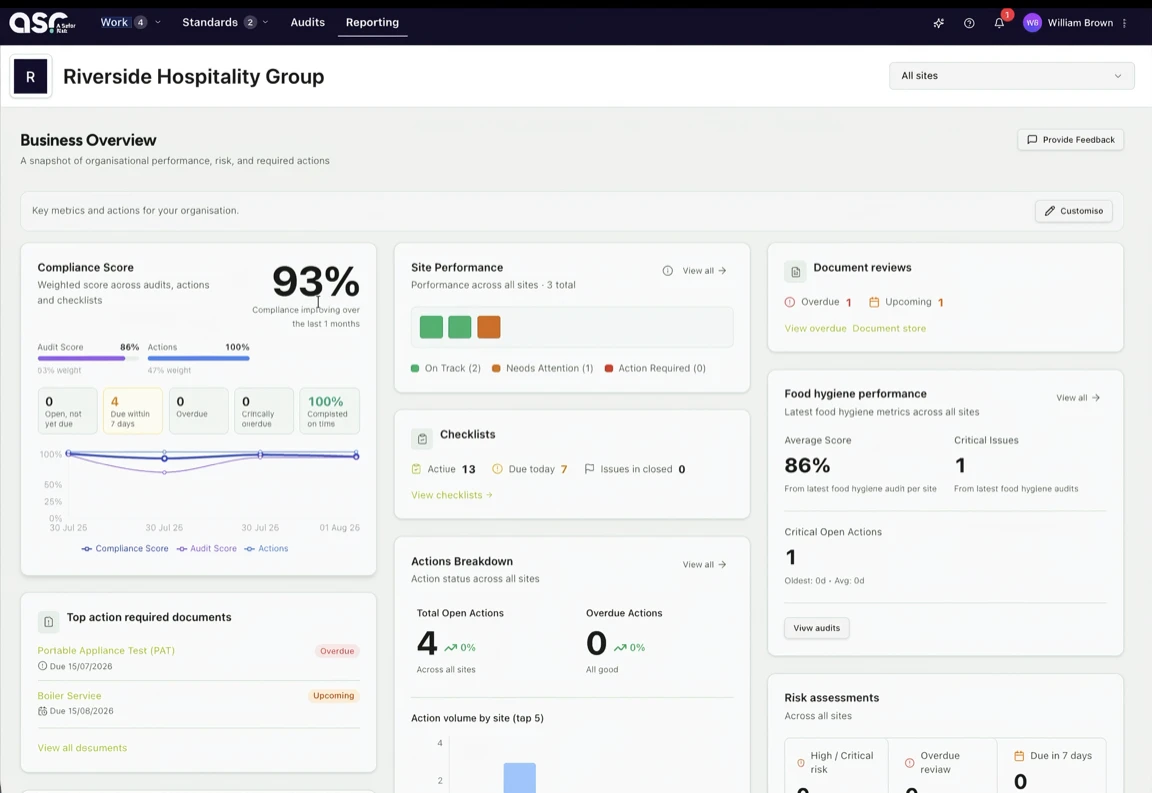
You open one screen. You see each site. You see which checks are still open and who owns the overdue ones. No monthly spreadsheet compiled from phone calls.
- Same morning
One list for all sites
You open the dashboard before lunch. You see which kitchens finished opening checks and which did not.
- Per site
Click the overdue check
Pick a site. Open the checklist that is late. You do not flip through a paper diary.
- Named owner
A name on each late check
Overdue work shows who must finish it.
- Actions
Due dates on fixes
A fridge fault or cleaning miss becomes an action with an owner and a due date.
How A Safer Risk helps
Checklists on the floor, status in one dashboard
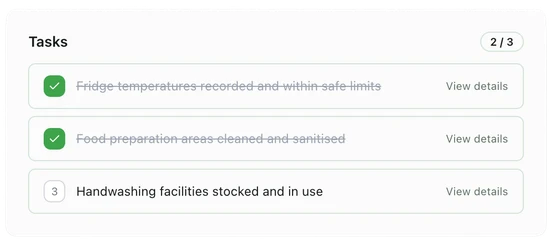
Staff run checklists on shift. Head office opens the compliance dashboard to see missed and overdue checks by site. Actions and SFBB records sit in the same system.
Checks on the kitchen floor
Opening and closing checks, temperatures, cleaning and SFBB-style sign-off on a phone or tablet where staff already work.
One morning view for the group
Head office and area managers see every site side by side: done, missed, overdue and open actions. No folder run.
Actions with owners
A failed check or audit finding becomes an action with a due date. It stays on the dashboard until someone closes it.
SFBB and audit files together
Safe methods, diary sign-off, four-weekly review and supplier lists live next to daily checks for an EHO visit.
On HACCP rather than SFBB? See our HACCP software guide for monitoring records on the same dashboard.
Case study
Fylde Care Group, three homes
Fylde Care Group run Rose House, Bluebell House and Hedges House on A Safer Risk. Kitchen and care teams complete checks and audits on phone or desktop. Group leaders see overdue tasks and open actions without ringing each home.
Read the Fylde Care Group case study
What changed
- Consistent checklists and audits across all three homes
- Faster visibility of overdue tasks and open actions
- Less time spent chasing updates across sites
FAQ
Questions on missed kitchen checks
- How do I know if daily food safety checks were missed at another site?
- With paper or WhatsApp you usually find out on a site visit or when someone reads the diary days later. You set the same checklists at each kitchen. Done and missed checks appear on one dashboard. Area managers and head office see that list the same morning.
- What should happen when a kitchen check is overdue?
- The site should know at once. Head office should see it without sending messages. Overdue checks stay on the dashboard with a named owner. Problems can become actions with a due date, not a note that never gets closed.
- Does this replace our SFBB pack or HACCP records?
- No. A Safer Risk holds the monitoring and records you already run under Safer Food, Better Business or a HACCP-based system. It does not write or approve your food safety management system. Our SFBB and HACCP guides explain how daily checks fit each approach.
- Will an environmental health officer accept digital checklist records?
- UK law does not require paper records. At an inspection, the EHO wants proof your procedures match the kitchen and that checks, problems and fixes are recorded. Digital records with timestamps and names can support that. You stay legally responsible for food safety.
- Can kitchen staff complete checks offline?
- Yes. Staff complete checklists on a phone or tablet on shift, even when Wi-Fi is weak. Records sync when the device is back online. The dashboard shows what happened on the floor, not what was typed up later.
- Is A Safer Risk only for care homes?
- No. Pub and restaurant groups, contract caterers and care providers use it. Care home groups can read our care home food safety guide for EHO and CQC records.
- How much does A Safer Risk cost for multiple sites?
- Core is £69 per site per month on a 12-month contract. That covers checklists, document storage, actions and the compliance dashboard. Professional is £149 per site per month and adds audit and reporting. See pricing or book a demo.
Keep reading
SFBB, HACCP and paper checklists
Daily checks sit alongside your SFBB pack, HACCP records or a paper checklist pack. These guides explain how each fits.
Safer Food Better Business
SFBB app and digital pack
Run the FSA pack's safe methods, daily diary and 4-weekly review as a digital SFBB app across every kitchen.
SFBB diary
Digital SFBB diary
Daily opening and closing checks, temperature records and sign-off without paper diary refills.
HACCP-based systems
HACCP software
The seven HACCP principles in plain English, and where monitoring software can support your records.
Free download
Free food safety checklist pack
Printable opening and closing checks, temperature logs and a cleaning schedule for UK kitchens.
Next step
See overdue checks across your sites
Book a demo or start a free trial. We will walk through the dashboard and checklist setup for your kitchens.