
Background
What is the SFBB diary?
In the FSA's Safer Food, Better Business pack for caterers, the diary is where you prove your safe methods were followed each trading day. You complete the colour-coded safe methods once, keep them under review, then use the diary for ongoing records.
Searches for an SFBB diary, a safer food better business diary or SFBB diary refill often come from teams tired of paper books, missing signatures, or buying new diary pages every few months. A digital diary keeps the same FSA routine, with timestamps, reminders and a record head office can see without visiting every site.
Our SFBB app and digital pack guide explains the full pack, safe method sections and how software maps to each part. This page focuses on the daily diary and the records that sit next to it.
Inside the paper pack
What the FSA SFBB diary includes
The caterers diary is more than a single sign-off line. These are the sections operators usually recreate as checklists when they move off paper.
- Week-to-view diary pages with opening and closing check lists
- Space to note anything different or anything that went wrong
- 4-weekly review section
- Staff training record
- Suppliers' and contacts lists
- Cleaning schedule and prove it records
Every trading day
How the SFBB diary sign-off works
The FSA says the diary should take about a minute a day unless there is something to write down. These steps are the same on paper or in software.
Opening checks
Confirm start-of-day tasks from your Management safe methods were completed before service.
Record problems and changes
If something went wrong or you did something differently, write what happened and what you did about it.
Closing checks
Confirm end-of-day checks were done before the kitchen closed.
Sign the day off
The person running the business signs to say all safe methods were followed, or delegates to another trained member of staff.
Temperature logs, cleaning tasks and cooking checks often sit alongside the diary in the same pack. In A Safer Risk they become scheduled checklists tied to the same safe methods, so the EHO sees one joined-up record instead of three separate books.
Paper vs digital
Why teams move off SFBB diary refills
Paper works in one disciplined kitchen. Across pubs, restaurants or care homes, the same diary problems show up again and again.
Diary refills and lost pages
Paper SFBB diaries run out, pages tear out, and spare refills are not always to hand when a new manager starts on a Monday.
Signatures without proof
A tick and a name at the end of the week do not show when opening checks actually happened, or who was on shift.
Temperature logs in a separate book
Fridge readings live on another sheet, so the EHO flips between books to join up a problem with the diary note.
No view across sites
Head office only discovers missed days when someone collects folders, or when the same fridge fault appears in three kitchens.
What a digital SFBB diary adds
Scheduled checks with timestamps
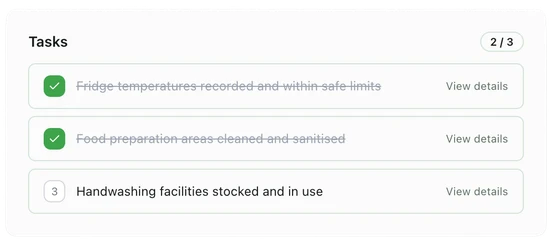
Opening, closing, temperatures and weekly tasks run on a phone or tablet, with who completed each check and when.
Notes and photos at the point of check
Capture what went wrong, what you did about it, and evidence in the same record instead of a hurried note at closing.
Actions that stay owned
Problems become tracked actions with an owner and due date, not a line in the diary with no follow-up.
One dashboard for every kitchen
Area managers and head office see completion, missed checks and open actions for every site before an EHO visit.
Platform fit
How A Safer Risk maps to SFBB diary records
Use the same wording as your safe methods so staff and inspectors recognise each check. Head office uses the compliance dashboard to see every site.
Opening and closing checks
Daily start-up and shut-down routines from your SFBB Management safe methods.
Fridge and freezer temperatures
Routine readings with a clear record when something is out of range.
Daily diary sign-off
Timestamped completion that shows who confirmed safe methods on each trading day.
Weekly extra checks
Maintenance, deep cleans and prove it tasks that the FSA asks you to note each week.
4-weekly review
Structured review of diary entries, safe methods and recurring problems.
Not ready for software yet? Our free food safety checklist pack has printable opening and closing checks and temperature logs you can use while you still run a paper SFBB diary.
FAQ
SFBB diary questions
- What is the Safer Food Better Business diary?
- The diary is the daily record section of the FSA's Safer Food, Better Business (SFBB) pack for caterers. Each trading day, the person responsible for running the business confirms opening and closing checks were done, notes anything different or anything that went wrong along with what was done about it, and signs to say the safe methods were followed. The pack also includes a 4-weekly review, staff training record, suppliers' list, cleaning schedule and prove it records.
- Can I use a digital SFBB diary instead of the paper book?
- UK law does not require SFBB records to be handwritten. Many operators now complete the same checks and sign-offs in software on a phone or tablet. At an inspection, the environmental health officer wants evidence that safe methods match how the kitchen works and that the diary shows them being followed, with problems noted and put right. A digital record helps with that, but the food business operator stays responsible for food safety.
- Do I still need SFBB diary refills if I go digital?
- If you move the daily sign-off and related records into software, you no longer need to buy or print new paper diary pages for day-to-day use. Many businesses keep their completed FSA safe methods as the reference and run checklists that mirror the opening, closing and weekly tasks from the pack. Keep past paper diaries available if you are replacing a long-standing folder, and tell your local authority when you switch.
- What should the SFBB diary cover each day?
- Tick that opening checks from your Management safe methods were done, note anything different or any problems with corrective action, tick closing checks, then sign the day off. At the end of each week, record extra checks such as equipment maintenance or cleaning the freezer. Temperature readings and cleaning tasks often sit alongside the diary in the same pack, and in software they usually become scheduled checklists linked to the same safe methods.
- How does A Safer Risk handle the SFBB diary sign-off?
- Opening and closing checks run as scheduled checklists for each site. Each completion records who did it and when, so the daily sign-off is timestamped rather than written up later. Notes, photos and incidents can be added at the point of check. The 4-weekly review can be scheduled as a four-weekly checklist, and the compliance dashboard shows missed checks and overdue actions across sites.
- Is the SFBB diary the same as a full HACCP plan?
- No. SFBB is a pack that helps smaller businesses meet food hygiene law using safe methods and a diary instead of writing a full HACCP plan from scratch. A Safer Risk supports monitoring, records, actions and day-to-day SFBB-style checks. It does not replace a documented HACCP plan where your local authority expects one. See our guide to HACCP monitoring software for the difference.
- How much does a digital SFBB diary cost with A Safer Risk?
- Core is £69 per site per month on a 12-month contract and lists Safer Food Better Business as its food safety management system, with checklists, a diary, actions and document storage. Professional is £149 per site per month and adds deeper audit and reporting. Compare plans on the pricing page or book a demo to walk through your sites.
Keep reading
Related food safety guides
Safer Food Better Business
SFBB app and digital pack
Run the FSA pack's safe methods, daily diary and 4-weekly review as a digital SFBB app across every kitchen.
HACCP-based systems
HACCP software
The seven HACCP principles in plain English, and where monitoring software can support your records.
Free download
Free food safety checklist pack
Printable opening and closing checks, temperature logs and a cleaning schedule for UK kitchens.
Next step
Run your SFBB diary digitally across every site
See how checklists, the compliance dashboard and actions fit your daily diary routine, on a demo or in a free trial.